The EA FC 26 arrives with improvements and adjustments across various game modes, and one of the most attention-grabbing for the community is the Clubs Mode. Extremely popular among players who enjoy cooperation, strategy, and online competition, this mode allows you to create a virtual athlete and compete alongside friends in a fully collective environment.
Throughout this article, we will explain everything about the ea fc 26 clubs mode, from the basic concept to practical tips for leveling up faster and making the most of the experience.
How does the EA FC 26 Clubs Mode work?
The Clubs Mode is a cooperative and competitive online experience, where each player controls only one athlete on the field. The main focus is teamwork, as victories depend on collaboration among all participants.
In simple terms, how the ea fc 26 clubs mode works: you create your player, join or create a club with friends, and compete in online matches against other clubs formed by real players. The collective performance defines the team's success, not just individual plays.
This mode is ideal for those who enjoy a more strategic football experience, constant communication, and the feeling of group play.
What is the Clubs Mode in EA FC 26?
The ea fc 26 clubs mode is different from other popular game modes, such as Ultimate Team. While in clubs ultimate team ea fc 26 the focus is on assembling a squad with cards, buying players, and managing resources, in Clubs Mode the highlight is the player created by you.
Here, there are no cards or packs. Each person controls only their Pro Player, and progression happens as you play matches, fulfill roles on the field, and contribute to the club's performance.
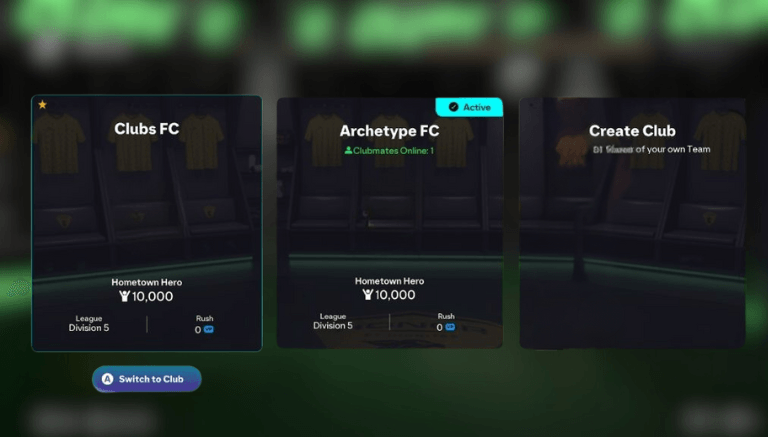
How to create or join a club in EA FC 26?
Creating or joining a club in pro clubs ea fc 26 is a simple process:
You can create a club from scratch, choosing a name, badge, and uniforms.
You can also join an existing club by receiving an invitation from friends or searching for open clubs.
Each club can have multiple members, making it easier to form complete teams for matches.
This flexibility allows for both casual and more competitive play.
How does the Pro Player work in Clubs Mode?
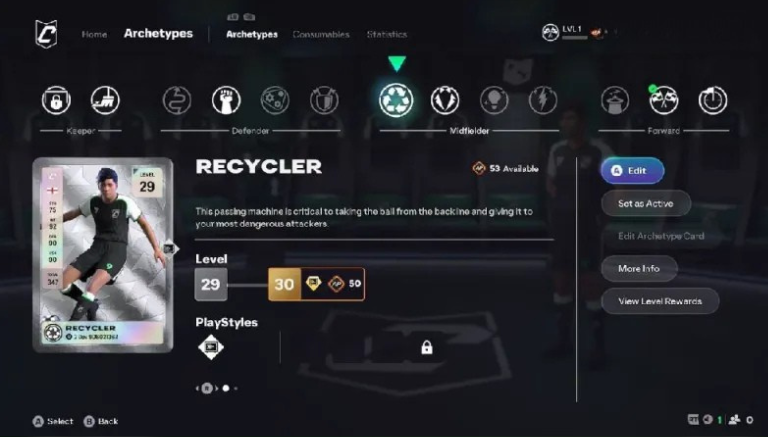
In Clubs Mode, you create your Pro Player, which is the athlete controlled exclusively by you. You can customize appearance, position on the field, and playing style.
The player's progression happens as you participate in matches. By playing well, your Pro Player gains experience, improves attributes, and becomes more efficient in your role. Choosing the right position is crucial, as each role on the field requires specific characteristics, such as speed, passing, marking, or finishing.
Progression system and levels in Clubs Mode
The progression system of the ea fc 26 clubs mode is based on levels and experience. The more you play, the better your athlete becomes. Some important points:
Actively participating in plays accelerates progression.
Playing in the correct position increases effectiveness.
Victories and good collective performance help you level up faster.
Progression encourages commitment to the club and the team.
How do matches work in Clubs Mode?
The great appeal of the Clubs Mode is the ability to play with up to 11 real players on the field, each occupying a different position. This creates extremely dynamic and realistic matches.
When all spots are not filled, the rest of the team is controlled by AI. These automatic players help maintain team balance, but do not replace the efficiency of well-coordinated human players.
Having you and 10 friends playing together transforms each match into a true collective football experience.
Tips for leveling up faster in EA FC 26 Clubs Mode
Some ea fc 26 clubs mode tips can make all the difference in your progression:
Prioritize teamwork, avoiding excessive individual plays.
Use voice communication to organize the team.
Choose a position that fits your playing style.
Be tactically disciplined and fulfill your role on the field.
The better the team's chemistry, the faster everyone levels up.
Frequently Asked Questions about EA FC 26 Clubs Mode
Is Clubs Mode online?
Yes. Clubs Mode is entirely online and focused on matches against other players.
Can I play alone in Clubs Mode?
It is possible to play alone, but the experience is much more fun and effective with friends on the team.
Does Clubs Mode have crossplay?
EA FC 26 maintains support for crossplay on compatible platforms, making it easier to play with friends on different consoles.
Can I earn coins or rewards?
Clubs Mode does not use coins like in Ultimate Team, but offers progression, levels, and recognition within the club.
Do I need to spend money in Clubs Mode?
No. Clubs Mode does not require additional spending to level up your player.